
















With the continuous updating and intelligent development of modern electronic products, human-machine interface (HMI) has received increasing attention and application, enriching people's experience. As an important part of it, touch sensing technology is also rapidly developing. Currently, touch technology is mainly divided into resistive touch and capacitive touch. As a rapidly developing new technology in recent years, capacitive touch sensing technology is characterized by its lack of mechanical loss, long lifespan, high sensitivity, space saving, and rich touch actions
The advantages are being increasingly widely applied.
In recent years, Yspring has been committed to developing "MCU+" around intelligent control directions such as the Internet of Things and human-computer interaction. Its main products include a series of SOC or intelligent module products such as touch control chips, gesture control chips, gas sensing chips, and IoT control chips. Huichun also provides customized chip and module development services to meet customers' differentiated application needs and provide one-stop overall solutions. Let's take a look at Huichun's latest touch pad keyboard solution!
Application plan
01 Touch PAD
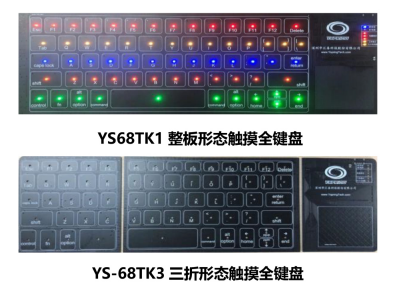
The YS68TK1/YS-68TK3 touch pad keyboard solution is based on our YS68F9916 touch MCU. Through mutual communication and self capacitance algorithm calculation processing between MCUs, it can be enumerated as a mouse and keyboard through USB devices, realizing the function of touch pad and touch keyboard
Overview of YS68F9916
ROM Size: Flash 8.0K x 14
RAM Size: 829 (XRAM)+256 (IRAM) Operating Voltage: 1.8V -5.5V
Communication interface: I2C+SPI+UART
Peripheral resources: LCD/LED driver, ADC module, touch module, RTC module, WDT module
Touch PAD keyboard solution
Scheme details:
The touch pad small keyboard solution is based on our YS68F9XXX touch MCU. Through mutual communication between MCUs and self capacitance algorithm calculation processing, it can be enumerated as a mouse and keyboard through USB devices, and the function of touch pad and touch keyboard can be achieved.
Program features: Built in flexible and stable touch panel detection algorithm, filtering algorithm, control algorithm, DPI adjustable, high sensitivity, high signal-to-noise ratio, with strong anti-interference ability. Support full keyboard function, with no conflicts between all keys, and can add and customize corresponding operation instructions according to various application needs. The keyboard backlight RGB light supports 5 modes, supports scrolling frequency and brightness adjustment, and supports power-off memory function.
Product Introduction
01 Extremely high appearance value
It is not an exaggeration to describe the YS68TK1 touch keyboard as stunning. Equipped with a pure black border, connect to the computer with a flat USB cable. After being powered on, it will light up with colorful lights, enough to make you have the impulse to "buy, buy". In addition, this keyboard has a higher "appearance value" in low light environments because it looks closer to products that appear in science fiction movies. If I were to rate the appearance, I would give it a full score. At this point, whether it's changing to a unique keycap or playing with traditional keyboards with lights, they are all far removed.
How does it feel to use 02?
Touch keyboard is a new concept product that challenges all traditional keyboards. If you want to choose it, while getting its cool appearance, you also have to accept its features that are different from traditional keyboards. And these features will overturn your past habits and feelings in daily use.
If you are sitting at a table, why not reach out your hands and imitate the posture of using a traditional keyboard, and try typing on a flat tabletop
Did you feel it? This is the feeling of using a touch keyboard. There will no longer be the tactile sensation of every physical button, nor will there be feedback on the key stroke of pressing and popping. Of course, you can't hear the "crackling" sound of keystrokes either.
Oh, by the way, there's one more thing that needs to be mentioned. It's just that the positions of the "F" and "J" keys no longer have the positioning protrusions of traditional keyboards
Usage skills
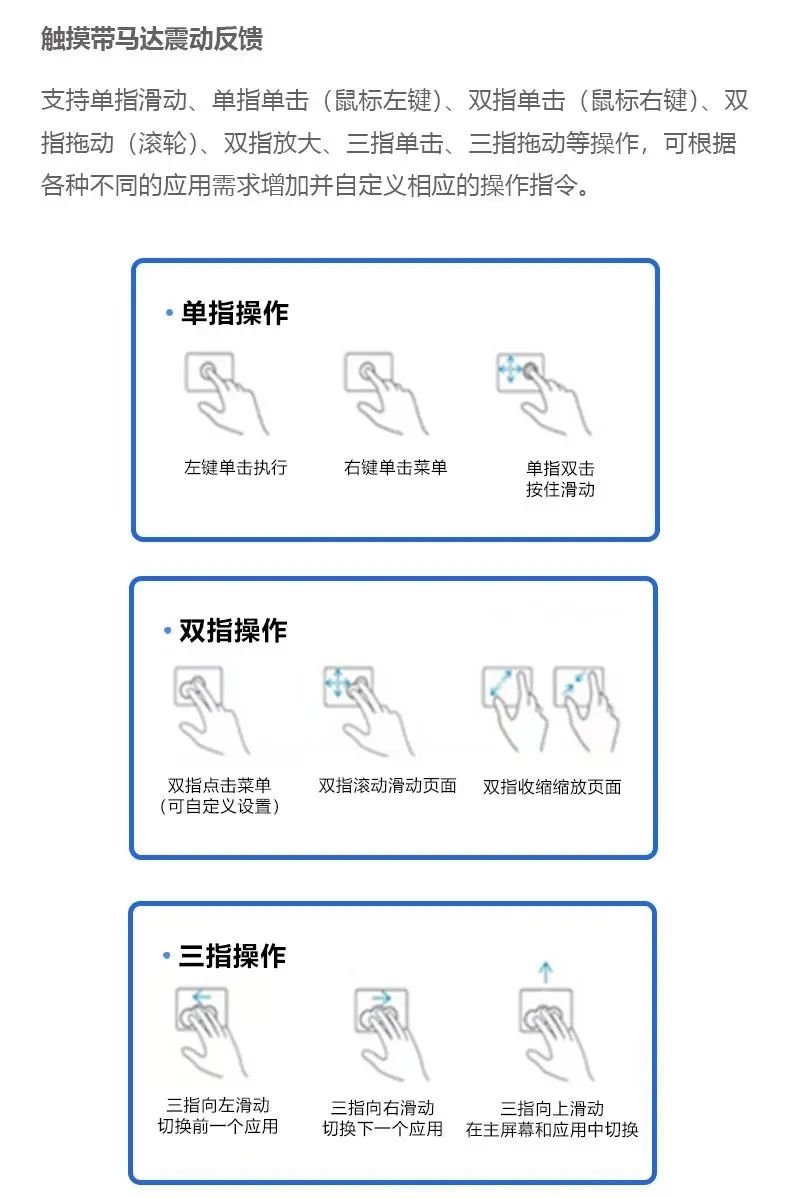
Touch with motor vibration feedback
Supports single finger sliding, single finger clicking (left mouse button), double finger clicking (right mouse button), double finger dragging (scroll wheel), double finger zooming, three finger clicking, three finger dragging, and other operations. Corresponding operation instructions can be added and customized according to various application needs.
matters needing attention
A touchpad is a pressure sensitive device, and if not properly protected, it can easily be damaged. So when using it, it is also important to pay attention to the following points:
1. Do not allow the touchpad to be contaminated with dust, liquids, or grease;
2. If your fingers are not clean, do not touch the touchpad;
3. Do not place heavy objects on the touchpad or other buttons;
4. Please make sure there is no excessive sweat or moisture on your hands, as excessive humidity can cause short circuits in the indicator device. When using it daily, keep the touchpad surface clean and dry;
5. Do not rest your hands or wrists on the touchpad when typing or using it. Due to the ability of the touchpad to sense any movement of fingertips, placing your hand on the touchpad may result in poor response or slow movement of the touchpad;
6. Only one finger is needed for operation, simultaneous operation with multiple fingers will cause confusion information on the touchpad.



0755-86227153





